Henosia Auth
Henosia Auth gives organizations a centrally managed authentication solution for all the apps they create with Henosia.
The key benefits are:
- Your Henosia account signs you into all Henosia apps that have Henosia Auth enabled
- Only members of your Henosia organization can sign into the published apps, with optional guest access for other email addresses/domains
- All apps use a centralized and managed authentication solution instead of relying on per-project authentication solutions like Supabase auth.
Supabase integration
When a Henosia project is linked with a Supabase project, Henosia Auth:
- Registers Henosia as a custom authentication provider in the Supabase project. This enables Supabase sign-in using Henosia user accounts and credentials.
- Ensures that signing into the Henosia app creates that same user in Supabase to enable Row Level Security (RLS). If a user with the same email already exists in Supabase, the user is linked with Henosia Auth's provider.
Restricting which members can sign in to a published app
Henosia Auth defaults published apps to allow sign in from all organization members.
You configure sign in to only allow a selected set of members in the builder navbar under "Environment settings", "Henosia Auth", "Members who can sign in to your published app".
For example, specific teams in the organization may need to work with sensitive data that only they should have access to through a published app. Two options are available:
- All members can sign in (Default): Everyone in the organization can sign in to the published app.
- Only selected members can sign in: Only the members you select, plus the app's owner and the owners/admins of the organization, can sign in.
The App Switcher only shows apps that members are able to sign in to.
Guest access to published apps
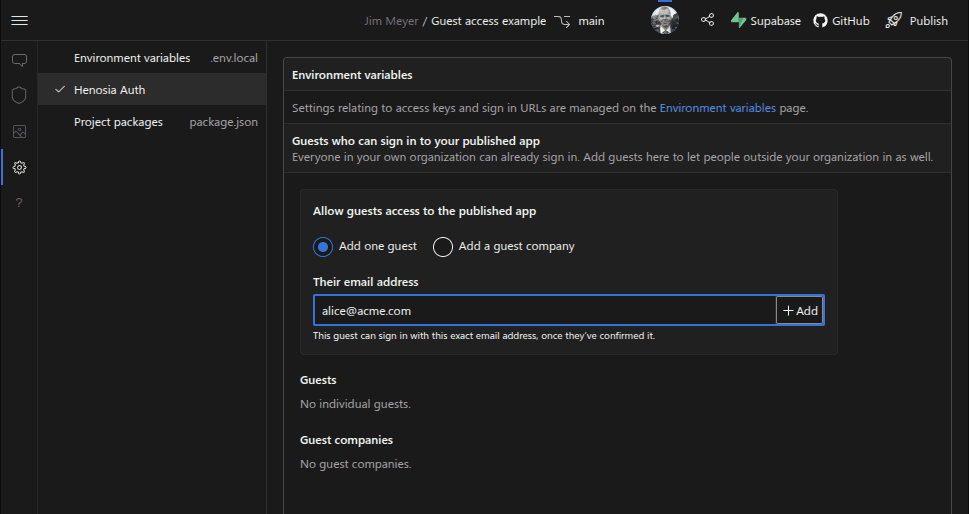
Henosia Auth defaults published apps to only allow sign in from the organization's members. Non-organizational members such as customers, partners, etc. can be allowed access using their individual email address or as a whole email domain.
Guest access only applies when signing into a published app. Access to the builder remains unchanged. Guests also cannot see other apps using the App Switcher.
Apps that make use of guest access are responsible for restricting which data and features guests have access to using Supabase RLS or other means of authorizations.
You can configure a project's guest access for specific email addresses/domains in the builder navbar under "Environment settings", "Henosia Auth".
Network restrictions for sign in
You can configure network restrictions for sign ins in the builder navbar under "Environment settings", "Henosia Auth". Two options are available:
- Allow sign in attempts from all networks (Default): Sign in with Henosia Auth can be attempted from any network address.
- Restrict sign in attempts to specific network addresses: Sign in with Henosia Auth can only be attempted from the addresses or ranges you list. Attempts from anywhere else are turned away before any credentials are checked.
Self publishing and local development
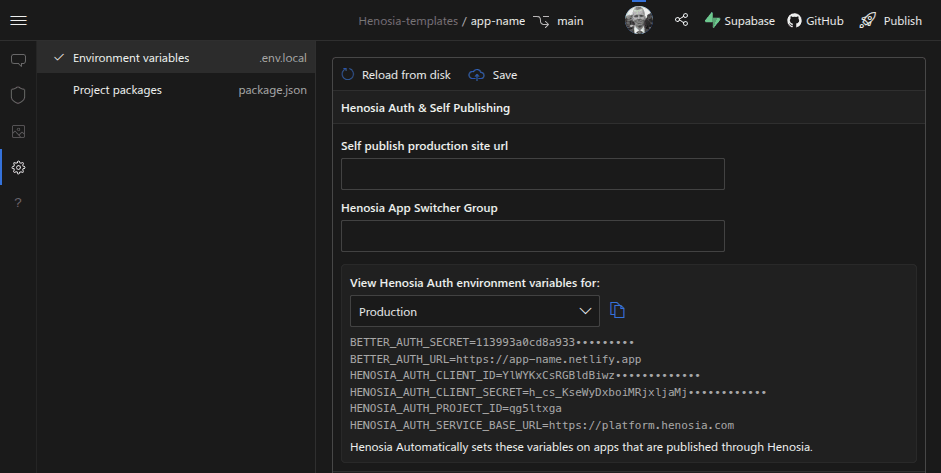
Environment variables relating to Henosia Auth are accessible from the builder navbar under "Environment settings", "Environment variables".
Henosia automatically sets these variables on apps that are published through Henosia.
Technical information
Henosia Auth builds upon better-auth. The authentication flow relies on the OAuth 2.1 Provider.